Dropping TDI and TDO to copy a two-pin header can force a rework when the fixture still needs a scan chain. Keep SWD when the device debug chapter and the probe both name SWD, and keep the JTAG signals when the test plan needs that chain.
These notes were compiled on 13 October 2026 from public Arm, SEGGER, and JTAG Technologies pages. No interface was timed for this page, and the two interfaces are not ranked.
Arm’s DSTREAM-HT interface guide says Serial Wire Debug uses two pins, SWDIO and SWCLK, where that guide describes JTAG as four pins. SEGGER’s SWD page, last edited 30 August 2023, calls SWD a two-pin interface in place of a traditional five-pin JTAG port, and says devices cannot be daisy-chained the way JTAG chains them. Arm’s DSTREAM-XT guide, read the same day, calls the CoreSight 10 connector a 10-way 1.27 mm header and maps pin 2 to TMS/SWDIO, pin 4 to TCK/SWCLK, and pin 6 to TDO/SWO. Those counts describe a connector or a protocol in the cited guide. They are not a measured speed. Fill the five-layer check, then copy the blank rows from your device chapter and your probe manual.
| Input or item | What the public page states | Why it matters |
|---|---|---|
| Protocol pin count | DSTREAM-HT: SWD uses two pins; JTAG is described there as four. SEGGER: two SWD pins in place of a traditional five-pin JTAG port | Count the signals the test needs before deleting pins |
| CoreSight 10 | DSTREAM-XT: 10-way, 1.27 mm pitch box header, JTAG, SWD, and SWO trace | Match the drawing to that header, not to a nickname |
| Shared names | DSTREAM-XT pin table: pin 2 TMS/SWDIO, pin 4 TCK/SWCLK, pin 6 TDO/SWO | SEGGER’s SWD table assigns both SWD pins to TMS. Do not copy that line |
| VTREF | DUI0499: an input that gives the probe the target debug-rail voltage so I/O levels match. A pull-up resistor on VTREF, if used, is no greater than 100 Ω | Record the rail on your schematic. This page states no rail voltage |
| SWO | SEGGER: optional, usually shared with TDO, and not present on every SWD device | Leave the cell blank until this device’s chapter names SWO |
| Boundary scan | JTAG Technologies: BSDL files for scan-capable devices, plus a board netlist | A two-pin debug link does not supply those files |
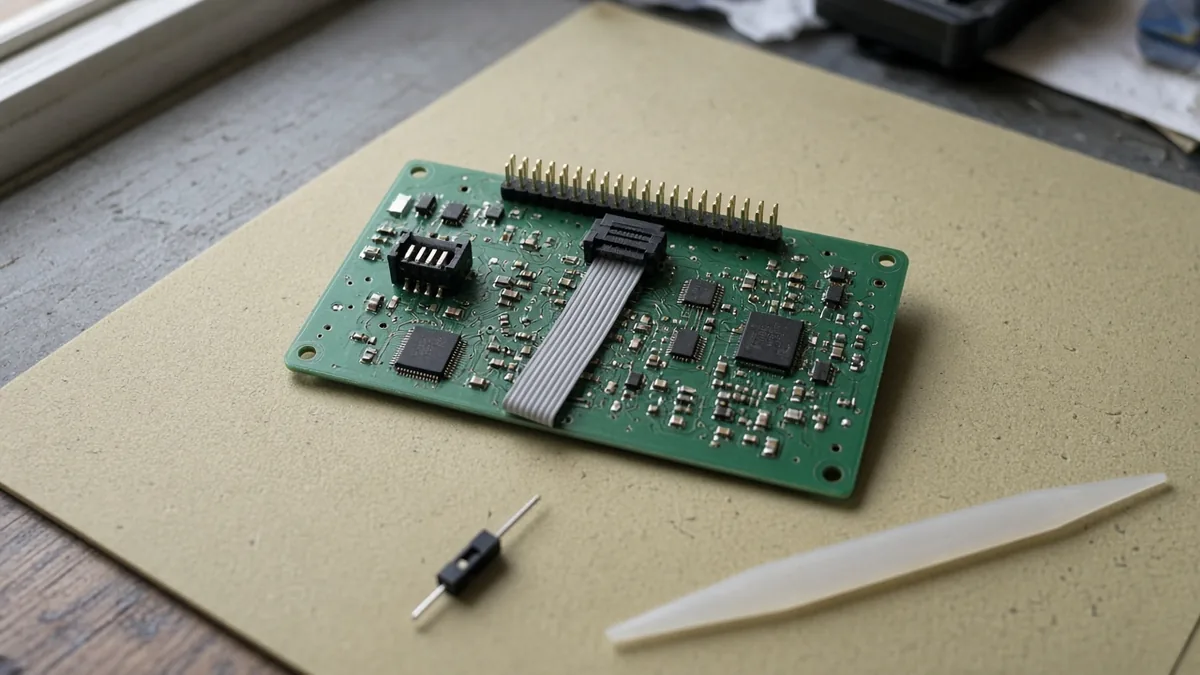
A ribbon cable and an unlabeled board on a bench mat. Example of a debug hookup. Not a named probe, a customer board, or a measured test.
Other notes in this category are on the Embedded Systems page. This checklist sits on the article index.
Which five choices decide the header?
Decide the protocol, the probe, the connector, SWO, and boundary scan as five separate rows. A dev-board header is not a substitute for the device chapter.
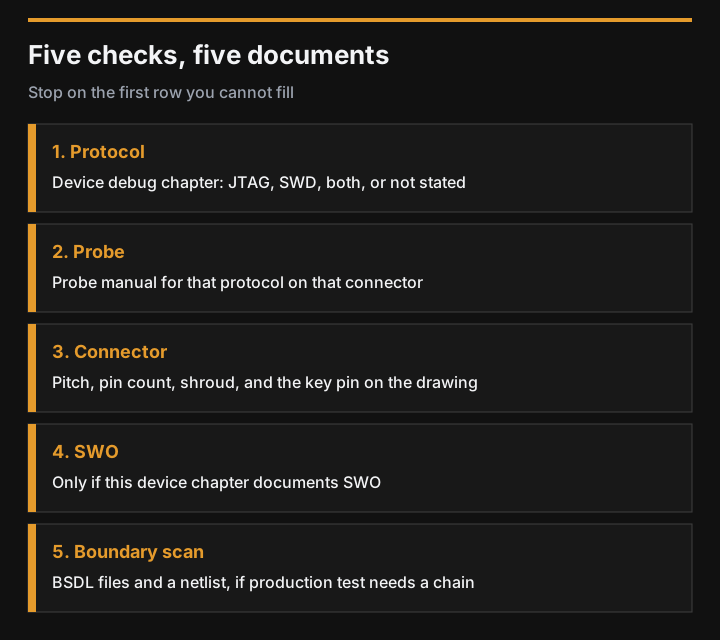
Figure 1. Stop on the first row you cannot fill from a document. Diagram of the check order. Not a test result.
| Layer | Question to close | Filled when | Do not assume |
|---|---|---|---|
| Protocol | Does this device’s debug chapter list JTAG, SWD, or both? | The chapter names it for this part number | A dev board’s header means this MCU bond-out has those pins |
| Probe | Does the probe manual list that protocol on the connector you will fit? | Both the chapter and the manual name it | A probe’s product name, such as ST-LINK, selects the protocol |
| Connector | Which pitch, pin count, shroud, and key does the fabrication drawing use? | The drawing matches one connector in a retrieved guide | The words “Cortex debug” are one pinout |
| SWO | Does this device document SWO, and do you need that trace pin? | The chapter and the pin you assigned agree | Every SWD part has SWO or ETM |
| Boundary scan | Does production test need a scan chain? | The plan lists BSDL files and a netlist, or it says the chain is not required | SWD replaces boundary scan |
Takeaway: Leave a row blank when the document is missing. A blank row is a reason to keep the pin, not a reason to delete it.
What does Arm print on the CoreSight 10 connector?
Arm’s DSTREAM-XT guide describes the CoreSight 10 connector as a 10-way 1.27 mm pitch box header for JTAG debug, Serial Wire Debug, and SWO trace. The same section says a non-shrouded header can short or contend, and Arm recommends a fully shrouded box header. It also says pin 7 must be removed for compatibility with CoreSight and MIPI specifications, and that the connector must be compatible with a Don-Connex A32-10-CGB1-G cable-mounted IDC socket.
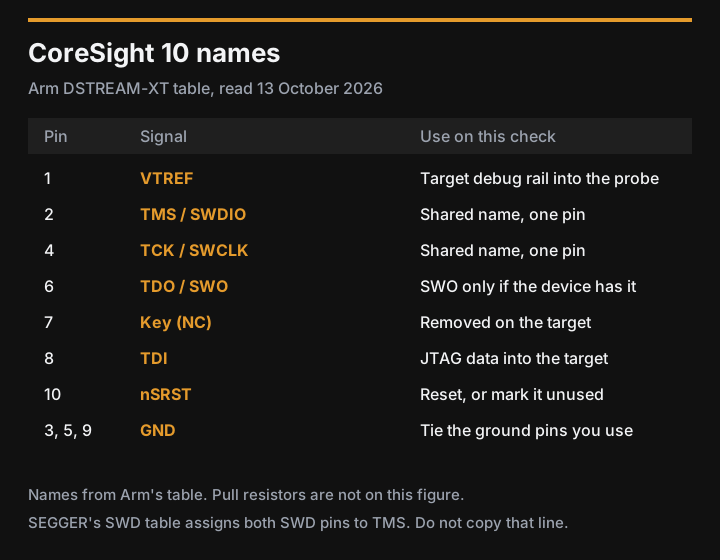
Figure 2. Signal names from Arm’s CoreSight 10 table. Pull resistors are in the text, not on the figure.
| Pin | Signal on the DSTREAM-XT table |
|---|---|
| 1 | VTREF |
| 2 | TMS/SWDIO |
| 3 | GND |
| 4 | TCK/SWCLK |
| 5 | GND |
| 6 | TDO/SWO |
| 7 | Key (NC) |
| 8 | TDI |
| 9 | GND |
| 10 | nSRST |
In the older DUI0499 CoreSight 10 signal table, the I/O column is from the debug unit. TDI, TMS, and TCK are outputs of the unit into the target. TDO is an input to the unit. SWDIO is input and output. SWCLK is an output of the unit. VTREF is an input to the unit: it supplies the probe with the target debug-rail voltage so the probe can match I/O levels. That table prints no rail voltage. If VTREF is pulled high by a resistor, DUI0499 says the resistor must be no greater than 100 Ω. That limit is for VTREF on that interface. It is not an SWDIO pull-up value.
DUI0499 advises series termination of SWDIO close to the target processor. The same edition’s CoreSight 20 table lists pin 16 as nTRST/TraceD1. A five-pin JTAG count that includes nTRST is that larger connector, not the four JTAG names on the 10-pin header (TMS, TCK, TDI, TDO).
Three Arm pages, all read on 13 October 2026, do not give one pull for every design:
- DSTREAM-HT says SWDIO is bidirectional and shared with the unidirectional JTAG TMS pin, and that a buffer must not block that bidirectional pin. It says SWDIO must be pulled high, and SWCLK pulled low, when no debug unit is connected. SWCLK is an input to the target.
- The ULINKpro Cortex Debug (10-pin) guide prints a 100K Ohm pull-up to VCC on SWDIO and a 100K Ohm pull-down to GND on SWCLK. It also says TCLK is SWCLK, TMS is SWDIO, and TDO is SWO.
- DUI0499 says TMS can be pulled high so the TAP stays inactive, and that TCK is typically pulled high.
Write down which of those three you are building to. The 100K Ohm figures belong to the ULINKpro guide. They are not a value for every probe. Resistors on an I2C bus are a different audit, in the I2C pull-up notes.
SEGGER’s connector page, last edited 17 March 2023, uses different nicknames and dimensions. Treat them as SEGGER’s labels, and match your drawing to the pitch and pin count.
| SEGGER label | Pitch and size SEGGER prints | What SEGGER says it supports |
|---|---|---|
| 20-pin standard, also called the ARM Standard JTAG Connector | 0.10 inch header, 1.3 x 0.365 inch (33 mm x 9.27 mm). Example: Samtec TST-110-01-L-D | JTAG and SWD |
| 19-pin Debug+ETM, also called the Cortex Debug+ETM Connector | 0.05 inch, 0.50 x 0.188 inch (12.7 mm x 4.78 mm). Example: Samtec FTSH-1110-01. SEGGER also allows a variant with pin 7 removed for keying | JTAG, SWD, and ETM |
| 9-pin debug, also called the Cortex Debug Connector | 0.05 inch, 0.25 x 0.188 inch (6.35 mm x 4.78 mm). Example: Samtec FTSH-105-01. SEGGER also allows a variant with pin 7 removed for keying | JTAG and SWD, with fewer pins than the 20-pin header |
Arm’s 10-way 1.27 mm header and SEGGER’s 9-pin 0.05 inch header are not declared to be the same part in either page. Compare pitch, pin count, and the key before you reuse a footprint.
Common mistake: Copying SEGGER’s SWD pin table, where both SWCLK and SWDIO are labeled “shared with TMS.” The paragraph above that table says SWDIO and SWCLK are overlaid on TMS and TCK. Arm’s CoreSight 10 table splits them: TMS/SWDIO on pin 2, TCK/SWCLK on pin 4. Use Arm’s pin numbers for that header.
Takeaway: Record VTREF’s net from your schematic. Do not fill the voltage cell from this page.
When does a scan chain still need JTAG?
JTAG Technologies, on its boundary-scan page read 13 October 2026, separates the test architecture from the port. Boundary scan is the test architecture. JTAG, IEEE 1149.1, is the interface and standard it names as the usual way to reach that architecture. Everyday speech mixes the two words. A schematic should not.
The same page says a boundary-scan setup uses a hardware controller on the chain, boundary-scan software, a BSDL file for each scan-capable device, a board netlist, and a test plan that places boundary scan next to ICT, functional test, or AOI. It says coverage depends on which devices are in the chain and how they connect, so some nets are outside the scan. It puts analog behavior outside basic IEEE 1149.1 boundary scan, and it lists high-speed interfaces as a case for other techniques. It also says boundary scan does not always reach full coverage.
SEGGER’s SWD page says daisy-chaining devices the way JTAG does is not possible on SWD. If the board has more than one TAP and the test plan needs them in one chain, that SEGGER limit is a reason to keep TDI and TDO. SWD remains the debug choice when the device chapter and the probe both name SWD and the test plan does not ask for that chain.
Takeaway: Ask the test plan for a BSDL list and a netlist before you mark TDI or TDO unused.
What do you record before you delete a pin?
Copy this table into the design notes. Leave a cell empty until the document in the last column is open. An empty cell is not a zero and not a default pin.
| Check | What to write | Leave it empty until |
|---|---|---|
| Device | Part number, revision, and the debug chapter title | That chapter is open |
| Protocol | JTAG, SWD, both, or not stated | The chapter names it for this part |
| Probe | Model, and the protocol that model will use | The probe manual names it |
| Connector | Pitch, number of ways, shroud, and whether pin 7 is removed | The fabrication drawing matches one guide above |
| VTREF | Net name and the target rail it references | The schematic shows that rail |
| Ground | Which ground pins of that connector are tied | The drawing shows them |
| Reset | nSRST or nRESET net, or a deliberate “not connected” | You chose it |
| SWDIO and SWCLK pulls | Direction, resistance, and which of the three Arm guides you followed | That guide matches your probe |
| TDI and TDO | Present, or unused, and why | The boundary-scan row is filled |
| SWO | Present, unused, or “chapter does not document SWO” | The device chapter says so |
| Boundary scan | BSDL list, netlist, and nets you accept as untested | The test plan asks for a chain, or says it does not |
| Extra devices | How many TAPs share the header | You know whether a JTAG chain is required |
Takeaway: Delete a pin only after the protocol row, the probe row, and the boundary-scan row agree that the pin is unused.
When this page does not settle the header
- The device chapter is for a different revision, or it never names JTAG or SWD. Stop at the protocol row.
- The probe is not one of the Arm units in the sources. Use that probe’s own interface guide for pulls and for the rail it accepts. The 100K Ohm pulls and the 100 Ω VTREF limit stay with the Arm pages that printed them.
- You need ETM or another trace port. SEGGER’s 19-pin heading says that header can carry ETM. This page does not assign ETM pins.
- SWO or a BSDL file is required and the device chapter does not provide it. The missing document blocks the row. It does not become a yes.
- More than one TAP must share a chain. SEGGER’s daisy-chain limit on SWD applies, and the JTAG data pins stay until the test plan says otherwise.
- A probe that is attached can hide a watchdog reset. This page records the header. It does not read reset flags. Save them, and repeat a no-refresh check with the probe unplugged, using the STM32 watchdog reset log.
Method and sources
Compiled on 13 October 2026. SEGGER’s SWD page, SEGGER’s connector page, and the JTAG Technologies boundary-scan page were downloaded that day and returned HTTP 200. SEGGER’s own edit lines say 30 August 2023 and 17 March 2023. The JTAG Technologies page shows a 2026 copyright and no separate article date.
Arm’s developer and support hosts returned HTTP 403 to a direct download from this machine. The CoreSight 10 pin names, the 1.27 mm pitch, the shroud warning, the pin 7 note, the Don-Connex socket note, the VTREF description, the 100 Ω VTREF resistor limit, the CoreSight 20 pin 16 nTRST/TraceD1 line, the two-pin and four-pin wording, the SWDIO and SWCLK pull directions, and the ULINKpro 100 kΩ figures are the public documentation text for the Arm URLs listed below, read the same day. Two of those Arm texts, DSTREAM-XT and DUI0499, print the same CoreSight 10 signal names. No speed was measured, and no ranking is made.
The sources list at the end of the page links those documents. Read the device chapter and the probe manual before you change a footprint.
Before a memory-driven board revision, use the DDR3 and DDR4 PCN checklist to separate the affected part number, purchase deadline, shipment deadline, and replacement approval. This keeps the lifecycle decision alongside the debug-access review.
Related reading
- Embedded Systems: other notes filed in this category.
- Article index: the list this checklist sits on.
- I2C pull-up notes: a different resistor audit, for an I2C bus rather than a debug header.
For an accelerator board revision, the NXP Ara240 chip and M.2 module integration checklist separates silicon, module, host, BSP, runtime and model evidence before you commit the evaluation BOM. Keep those decisions alongside the debug-access record.